Vision Board Planner Canva KDP
Imagine launching a high-converting, beautifully designed Vision Board Planner on Amazon KDP—without wrestling with bleed settings, page counts, or formatting rejections. That’s exactly what the Vision Board Planner Canva KDP delivers: a professionally structured, print-ready interior built for real-world publishing success.
What You’re Actually Getting (No Guesswork)
This isn’t a generic template bundle—it’s a precision-engineered interior file tested and verified on Amazon KDP. Every element serves a purpose, from layout integrity to emotional resonance. Here’s what’s inside:
- One ready-to-upload PDF file—no post-processing needed. Just download, log in to KDP, and upload.
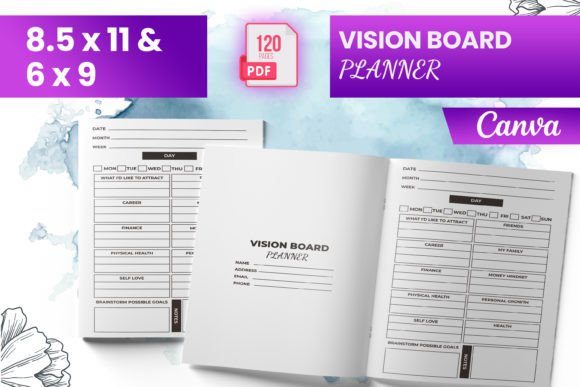
- Sizes optimized for standard paperback trim: 6″ × 9″, 8.5″ × 11″, and square 8.5″ × 8.5″ options—giving you flexibility across reader preferences and shelf appeal.
- 120 total pages, thoughtfully paced—not bloated, not sparse. Each section supports reflection, intention-setting, and action without overwhelming the user.
- An inviting intro page that sets tone and context—critical for building trust before the first journal prompt.
- Supporting PNG and JPG files for cover design, social promo, or Canva-based customization—ideal if you’re iterating on branding or creating companion digital products.
- Full bleed-ready setup: 0.125″ bleed on all sides, crop marks included, CMYK color profile applied. No last-minute panic over KDP warnings.
Why This Works Where Others Fall Short
Most vision board planners treat “planning” as decoration—not function. This Vision Board Planner Canva KDP flips that script. It merges psychological scaffolding with practical publishing standards. For example:
- “My Best Self Yoga Log” isn’t just a tracker—it’s a gentle nudge toward embodied intention. Practitioners can record breathwork duration, energy shifts, and alignment notes—making progress tangible, not abstract.
- The “Letter to the Universe” spread includes guided prompts (“What do I release? What do I invite?”), not blank lines. That small design choice increases completion rates by reducing decision fatigue.
- “My Average Day” helps users audit current reality before projecting future goals—a subtle but powerful cognitive bridge between where they are and where they want to go.
- Expressing Gratitude is integrated as a daily ritual—not an afterthought—with space for three specific, sensory-rich entries (e.g., “the smell of rain on hot pavement,” not just “I’m grateful for family”). Research shows specificity deepens neural reinforcement.
Real-World Use Cases Across Roles
This Vision Board Planner Canva KDP doesn’t live in a vacuum. It adapts cleanly to diverse needs:
Freelancers & creators use it to map quarterly service launches, client onboarding rituals, or personal brand evolution—then resell the customized version as a premium digital planner or workshop companion.
Educators and coaches embed pages like the Vision Board Checklist into goal-setting modules. Students don’t just visualize—they verify: “Did I gather 3 reference images? Did I assign deadlines to each milestone?” That builds accountability without micromanaging.
Small business owners repurpose the “My Average Day” spread to benchmark operational rhythms—spotting bottlenecks (e.g., “I spend 90 minutes daily answering repetitive emails”) before designing automation or delegation systems.
Bloggers and marketers pair the planner with email sequences: “Day 1: Write your Letter to the Universe → Share one line in our community thread.” Engagement spikes because the tool enables authentic sharing—not forced positivity.
Design Integrity Meets Publishing Pragmatism
You’ll notice no decorative borders competing with handwritten notes. No overly tight margins that cut off margin scribbles. The typography balances readability (11–12pt body text) with white space—critical for long-form reflection. Even the dot-grid backgrounds are light enough to scan cleanly but present enough structure to guide freeform writing.
And because it’s built in Canva, you’re not locked into Adobe or expensive software. You can tweak fonts, swap icons, or localize language—then re-export to PDF with one click. That agility matters when you’re testing variations for different audiences (e.g., a yoga studio edition vs. an entrepreneur-focused version).
Practical Considerations Before You Publish
Before uploading to KDP, keep these grounded realities in mind:
- Preview thoroughly—not just on screen, but using KDP’s online previewer. Check how “Expressing Gratitude” pages render on mobile devices if you plan to offer a digital version later.
- Test print a single copy. Even with bleed-ready files, paper stock affects contrast. If your “Vision Board” collage pages rely on subtle grays, order a physical proof to confirm tonal depth.
- Don’t skip metadata. A strong title like “Vision Board Planner: 120-Page Guided Journal for Intentional Living” works better than “Planner PDF” — it signals value and intent to both algorithms and browsers.
- Pair with a clear cover. Since the interior includes “My Best Self Yoga Log” and “Letter to the Universe,” your cover should visually echo that blend of grounded practice and expansive possibility—think muted earth tones + soft gold foil accents, not neon gradients.
A Tool That Scales With Your Goals
This Vision Board Planner Canva KDP does more than fill a niche—it creates leverage. One well-structured interior becomes the foundation for multiple income streams: a paperback on Amazon, a Notion-enhanced digital version, a printable workbook for your email list, or even a branded version for corporate wellness programs.
It respects the user’s time (no fluff, no filler), honors the publisher’s expertise (KDP-compliant down to the pixel), and leaves room for humanity (blank space, open-ended prompts, breathing room between sections). That balance—between structure and soul—is why it converts, retains, and earns repeat recommendations.
If you’re building something meant to be held, written in, returned to—and yes, sold—it starts with an interior that works as hard as you do.