Summer Planner for Kids for Canva KDP
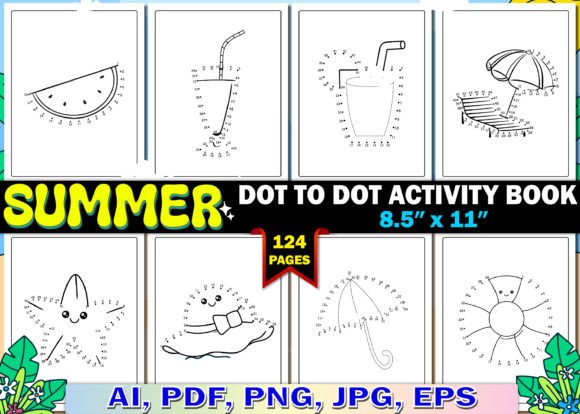
Planning summer for kids doesn’t have to mean frantic scheduling or printed pages gathering dust. The Summer Planner for Kids for Canva KDP is a thoughtfully structured, editable Canva template designed for creators who want to launch or expand their planner printable business—without starting from scratch. It’s not just another checklist sheet. It’s a flexible, classroom- and home-ready toolkit built for real use: daily reflection, activity tracking, travel prep, creative expression, and gentle learning—all wrapped in clean, kid-friendly design.
A Template Built for Real Workflow—and Real Revenue
This isn’t a static PDF you hand off and hope for the best. It’s an editable Canva link—meaning your buyers open it, click, type, drag, and personalize instantly. That usability translates directly into value: higher perceived quality, fewer support requests, and stronger customer satisfaction. For KDP sellers, that means better reviews and repeat buyers. For educators or camp coordinators, it means adapting pages in minutes—not hours—for different age groups or program themes.
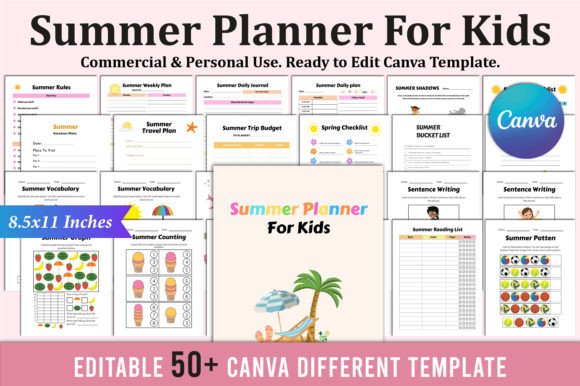
The interior includes 34 unique, purpose-built pages across nine functional categories—from structure (Summer Daily Plan, Weekly Plan, Summer Rules) to imagination (My Special Summer Day, Summer’s Best Thing, My Ice Cream Flavor). Each page serves a clear role: some anchor routine, others invite storytelling or early math skills (Summer Counting, Summer Graph, Summer Pattern). Even literacy gets thoughtful integration—Sentence Writing, Summer Vocabulary, and Book Review pages support gentle skill-building without pressure.
Creative Flexibility, Not Just Filler
What makes this planner stand out isn’t volume—it’s intentionality. Take the Summer Bucket List page: it’s not just lines to fill. Its layout encourages categorization (Try, Make, Learn, Explore), inviting kids to reflect on experience types—not just items. Or the Summer Travel Plan and Summer Trip Budget: they’re simple but scaffolded, helping families talk about cost, planning, and anticipation in age-appropriate ways.
For creators, that intentionality opens doors. You can:
- Bundle smartly: Pair the Picnic Planner + Summer Vocabulary + Summer Word Search as a “Backyard Learning Kit” for preschoolers.
- Localize with ease: Swap “beach day” for “farm visit” or “lake trip” in the Summer Itinerary—no design overhaul needed.
- Extend for educators: Use Summer Reading List and Book Tracker as part of a summer literacy challenge, adding teacher notes in the Notes section.
- Repurpose across seasons: The Spring Checklist page? Easily rebranded as “Pre-Summer Prep” or “End-of-Year Wrap-Up” with minor text edits.
Who Uses This—and How They Get Results
Educators use it as a low-prep, high-engagement tool for summer school, enrichment camps, or take-home packets. One third-grade teacher prints the Summer Daily Journal weekly, assigning one prompt (“What made you laugh today?” or “Draw one thing you saw outside”)—students bring it back in August, and she uses entries to spark community-building conversations.
Freelance designers embed it into client packages: a family photographer offers the Summer Party and My Special Summer Day pages as a free digital bonus with session bookings—adding emotional resonance while reinforcing brand warmth.
KDP publishers treat it as a foundation—not a finish line. They layer in custom covers, add branding fonts via Canva’s brand kit, or create companion workbooks (e.g., “Summer Math Puzzles” using the Summer Counting and Summer Graph layouts as visual anchors). Because the template is print-ready and high-resolution, they skip costly prepress checks and go straight to upload.
Hobbyists and small biz owners use it to prototype ideas fast: testing a “Summer Science Explorer” theme by editing the Summer Activity page with prompts like “Observe cloud shapes” or “Track how long ice takes to melt.” If engagement spikes, they scale it into a full product line.
Design Choices That Support Clarity—and Creativity
The layout avoids visual overload. Ample white space, consistent iconography, and intuitive typography hierarchy make each page scannable for both kids and adults. There are no distracting clipart clusters or forced “cute” motifs—just friendly, modern visuals that leave room for personalization. That restraint is strategic: it lets users project their own voice onto the planner, whether they’re a Montessori homeschooler, a bilingual family, or a city rec center running summer programming.
Consistency matters—but so does flexibility. Pages like Movies to Watch and A Movie Review share the same rating scale and reflection prompts, building familiarity. Yet each has distinct framing: one focuses on anticipation, the other on critical thinking. That subtle variation supports cognitive development while keeping the experience fresh.
Getting Started—Without Overcomplicating
You don’t need Canva Pro to use this. The editable link works in the free version. Start by opening the template, duplicating a page you’ll use most (like Summer Daily Plan), and swapping placeholder text with your brand voice. Adjust colors to match your existing product palette—Canva’s color picker makes that seamless. Then export as PDF (print-ready, CMYK-safe) or share the Canva link directly if selling digitally.
Pro tip: Add light instructional text in the corner of key pages—e.g., “Tip: Let your child choose 3 activities each morning” on the Daily Plan. It increases perceived value and reduces buyer confusion—without cluttering the design.
Finally, remember: the strongest planners don’t just track time—they hold space for joy, curiosity, and growth. The Summer Planner for Kids for Canva KDP gives you the structure to deliver that, consistently, across formats and audiences. It’s practical enough for Monday morning, inspiring enough for a sunset journal entry—and flexible enough to grow with your creative goals.