Editable Event Party Planner for Canva
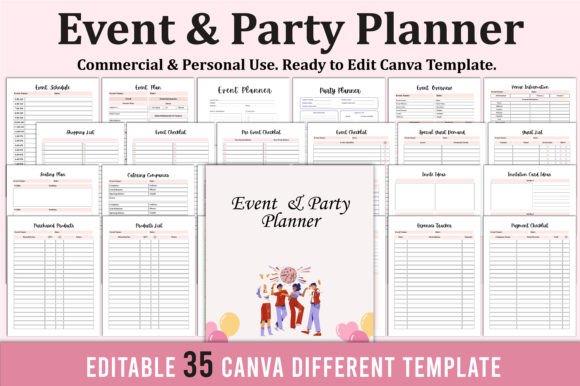
Planning a wedding, birthday bash, corporate gathering, or milestone celebration doesn’t have to mean juggling ten tabs, mismatched spreadsheets, and last-minute panic. The Editable Event Party Planner for Canva is a purpose-built, all-in-one digital toolkit designed for real-world use—not just pretty aesthetics. It’s not a static PDF you print and scribble on. It’s a fully customizable Canva template—35 distinct, professionally organized pages—all editable in your browser, no design skills required.
What makes this planner stand out isn’t just its breadth (Event Overview, Seating Plan, Budget Tracker, Guest List, Thank You Page, and more), but how thoughtfully it bridges intention and execution. Unlike generic planners that assume you’ll “figure it out,” this one anticipates real workflow gaps: the difference between a vague “send invites” task and a structured Invite Ideas → Invitation Card Design → Mailing Timeline → RSVP Tracker sequence. That structure saves hours—and avoids oversights that derail even well-meaning plans.
Common Missteps—and Why They Cost More Than Time
Many buyers treat editable Canva templates like digital paper: download, open, tweak a font, and call it done. But that approach misses the planner’s true value—and leads to avoidable friction.
Mistake #1: Assuming “editable” means “plug-and-play.” While the Editable Event Party Planner for Canva works instantly in Canva, some users overlook critical setup steps—like duplicating the template before editing (to preserve the original), or checking that fonts render correctly across devices. If you edit directly in a shared link without saving a personal copy, you risk losing work—or accidentally altering the master version others might access. Always duplicate first. Always save your edited version as a new Canva project with a clear name (e.g., “Maya’s Wedding Planner – Final”).
Mistake #2: Ignoring color mode and print specs. This planner ships in CMYK at 300 DPI—ideal for professional printing—but many users try to print from screen-optimized RGB files or low-res previews. The result? Dull colors, blurry text, or unexpected cropping. Since the file includes no bleed, margins are intentionally conservative. If you plan to print at home or via a local shop, confirm their requirements match the 8.5 × 11 inch, CMYK, no-bleed format. Don’t rely on Canva’s default print preview—it’s a guide, not a guarantee.
Mistake #3: Treating the planner as a checklist, not a system. Scrolling past the “Vision Board” or “Important Notes” pages because they feel “optional” is common—but costly. Those sections aren’t filler. A vision board grounds decisions (“Does this venue align with our rustic-chic theme?”). “Important Notes” captures time-sensitive details like vendor cancellation windows or allergy protocols—details easily forgotten mid-planning chaos. Skipping them doesn’t speed things up; it creates rework later.
What to Check Before You Commit
Before purchasing any Canva-based planner—especially one as comprehensive as this—verify three practical things:
- Your Canva account type: Free accounts support full editing of these templates—but if you need advanced features like brand kits or offline access, upgrade considerations matter. No hidden paywalls exist here, but know your baseline.
- Device compatibility: While Canva works on tablets and phones, complex pages like Floor Plans or Seating Charts are far easier to drag, resize, and annotate on a laptop or desktop. Test editing one page on your primary device before building your entire plan.
- File scope alignment: This planner includes 35 distinct pages—from “Catering Companies” to “Purchased Products.” Ask yourself: Do you need deep budget tracking *and* invitation ideation? Or are you planning a small, intimate gathering where “Guest List” and “Thank You Card” matter most? If your needs are narrow, a simpler template may suffice. But if you’re managing multiple vendors, timelines, and touchpoints, this breadth prevents context-switching between tools.
Better Approaches—Simple but Strategic
Start small, not perfect. Open the Editable Event Party Planner for Canva, go straight to the “Event Overview” and “Pre-Event Checklist” pages—and fill in just three non-negotiable items: date, core attendees, and one must-book vendor. That takes under five minutes and builds momentum. Resist the urge to customize every color or font upfront. Get content in first. Refine later.
Use the “Notes” pages intentionally—not as dumping grounds, but as decision logs. Instead of writing “Call florist,” note: “Spoke with Bloom & Vine on 4/12—$1,200 for centerpieces, 50% deposit due 4/25.” That transforms vague tasks into accountable, trackable actions.
And remember: this isn’t a replacement for human judgment—it’s a force multiplier. The “Event Budget” page won’t auto-calculate tax, but it *does* group line items by category (venue, catering, décor) so overspending in one area becomes visible before it’s too late. The “Shopping List” syncs with “Purchased Products” and “Payment Checklist”—so when you buy napkins, you can mark them off everywhere at once.
Why This Fits Real Planners—Not Just “Planner People”
This isn’t aimed at bullet journal enthusiasts who love color-coding for its own sake. It’s built for the educator hosting a school fundraiser, the freelancer managing client launch events, the small business owner coordinating pop-up markets, or the parent planning a bar/bat mitzvah with tight deadlines and big expectations. Its strength lies in quiet functionality: consistent spacing, intuitive tab order, logical grouping (e.g., “Contact List” and “Event Contacts” separated by role), and zero decorative clutter that slows down navigation.
If you’ve ever lost a vendor email in a sea of inbox threads, forgotten to confirm AV setup until the day before, or realized too late that your seating chart doesn’t fit the actual room dimensions—this planner addresses those pain points with precision, not platitudes.
The Editable Event Party Planner for Canva doesn’t promise stress-free planning. But it does remove guesswork, reduce redundancy, and turn scattered intentions into coordinated action—all within a tool most people already use daily. And when your next event runs smoothly—not despite the planning, but because of it—that’s the real ROI.