Best Selling 220 Canva Interior Bundle: A Practical Evaluation for Planners, Journalers, and Self-Publishers
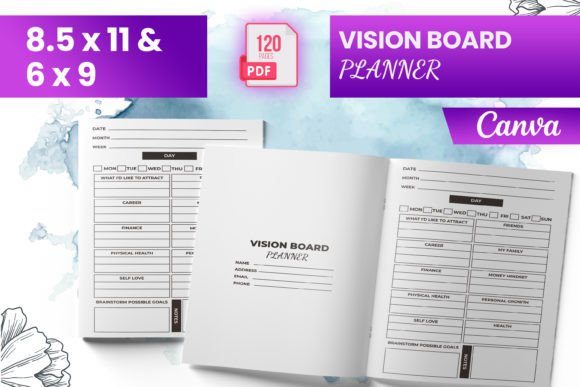
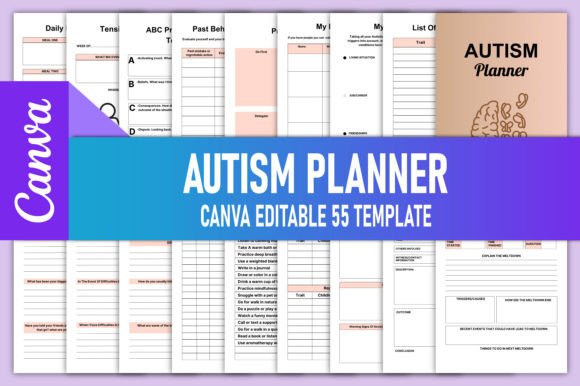
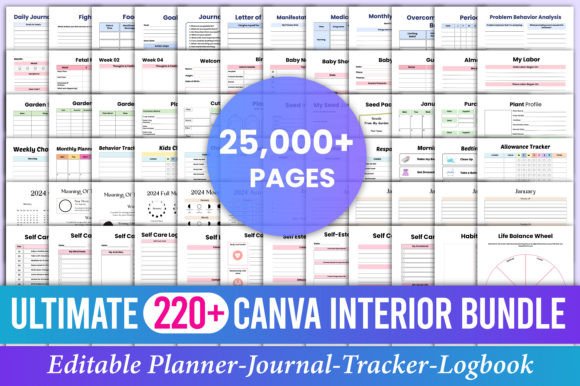
The Best Selling 220 Canva Interior Bundle is a curated collection of editable interior templates designed for personal use, coaching practices, and KDP (Kindle Direct Publishing) creators. Unlike static PDFs or pre-designed covers, every file in this bundle opens directly in Canva—meaning you can adjust text, swap fonts, recolor elements, rearrange layouts, and fine-tune spacing without design software or technical training. It’s built for flexibility, not just aesthetics.
What Makes This Bundle Distinct From Other Template Options?
Most digital planning or journaling resources fall into one of three categories: fully locked PDFs (non-editable), layered PSD files (requiring Photoshop), or single-purpose Canva templates sold individually. The Best Selling 220 Canva Interior Bundle sits between those extremes—it offers breadth *and* accessibility. With 220 interiors spanning planners, prompt journals, mental health tools, seasonal trackers, and creative writing aids, it supports diverse needs across life stages and goals.
For example, the 5 Year Garden Planner Dated includes monthly planting calendars with space for notes, weather tracking, and harvest logs—each page editable to match your region’s growing season. Similarly, the 12 Week Growth Mindset Journal for Woman uses affirming language and reflection prompts that remain customizable—not fixed in tone or structure. That level of adaptability matters when your audience values authenticity over uniformity.
How Does It Compare With Alternatives in Practice?
Compared to building interiors from scratch—or hiring a designer—the Best Selling 220 Canva Interior Bundle saves significant time and cost. A freelance Canva-savvy designer might charge $50–$150 per interior; recreating even 20 of these templates would easily exceed $1,000. This bundle delivers all 220 at once, with consistent formatting and print-ready output.
Yet it’s worth noting tradeoffs. Because everything is built in Canva, users need a Canva account (free or Pro). While most features work in the free tier, some advanced layout options—like transparent PNG uploads or brand kit syncing—require Canva Pro. Also, while each template is editable, they’re not programmatically dynamic: there’s no auto-populating date fields or conditional logic like in Notion or Excel-based planners. If you need real-time data integration or complex automation, this isn’t the tool.
Another distinction lies in format. Unlike printable-only bundles (e.g., ZIP files of JPEGs or flattened PDFs), this set provides editable links that open instantly in Canva. You make a copy to your own account, then edit freely—no downloading, re-uploading, or wrestling with layers. And crucially, final exports are high-resolution, CMYK-friendly PDFs optimized for print-on-demand services like Amazon KDP, IngramSpark, or local printers.
Who Benefits Most—and When Might It Fall Short?
This bundle serves well if you:
- Self-publish journals, planners, or guided workbooks on Amazon KDP and want interior consistency without repetitive design work;
- Run a coaching or wellness practice and create customized client handouts, reflection sheets, or goal-setting tools;
- Prefer working visually and value immediate edits over coding or scripting solutions;
- Need variety across topics—mental health, spirituality, creativity, habit-building—but don’t want to manage dozens of separate purchases.
It may be less suitable if you:
- Require strict ADA-compliant accessibility features (e.g., screen-reader–friendly tagging, alt-text control), which Canva currently limits in exported PDFs;
- Work primarily in desktop publishing tools like InDesign and prefer native .indd files for precise typography or bleed control;
- Need white-label licensing for commercial redistribution—this bundle is for personal or internal business use, not resale as-is;
- Want minimalism above all: some templates include decorative elements (borders, icons, watercolor textures) that may require extra editing to simplify.
Real-World Use Cases and Decision Factors
Consider two scenarios. First, a life coach launching a 90-day gratitude program might combine the 90-Day Gratitude Prompt Journal and the 52-Week Mental Health Prompts into one cohesive workbook. Using the editable Canva links, she adjusts colors to match her brand palette, replaces placeholder text with her voice and methodology, and exports clean PDFs for both digital download and KDP paperback versions—all within a few hours.
In contrast, a university counselor developing campus wellness materials might find value in the 50 Mental Health Sheets Bundle and 21 Day Prayer Journal, but would likely need to add institutional branding guidelines, compliance disclaimers, or multilingual translations. Those additions are possible in Canva—but require careful proofing before final export, especially for clinical or academic contexts.
A third case: someone exploring ADHD-friendly tools may appreciate the 100 ADHD Creative Writing Prompts. These aren’t generic “write about your day” cues—they’re structured to reduce executive function load (e.g., sentence starters, visual anchors, timed prompts). That specificity reflects thoughtful curation, not just volume.
Key Strengths Worth Highlighting
The Best Selling 220 Canva Interior Bundle stands out for its balance of scope and usability. Its strength isn’t just quantity—it’s the intentional grouping of related tools. For instance, pairing the 5 Year Goal Planner with the 5 Years Monthly Planner 2024–2028 creates continuity across timeframes, helping users bridge long-term vision with short-term action. Likewise, bundling astrology-themed prompts (50 Moon Astrology Creative Prompts) alongside self-discovery and manifestation content acknowledges how many people integrate intuitive frameworks into daily reflection.
Also notable is the inclusion of dated and undated versions where relevant. The 5 Years Monthly Planner comes pre-labeled through 2028, saving users from manual date entry—yet remains fully editable if you prefer to shift years or change month order.
Practical Tips Before You Begin
Before diving in, remember these practical steps:
- Make a copy first. Always duplicate the Canva file into your own account before editing—this preserves the original and avoids accidental changes to shared links.
- Check export settings. For KDP, select “PDF Print” (not “PDF Standard”) and confirm bleed and margin settings match your chosen trim size (e.g., 6×9 inches).
- Test readability. Zoom to 100% and scan for font sizes below 10 pt—especially in journals meant for handwriting. Adjust if needed.
- Verify color mode. Canva defaults to RGB, but print requires CMYK. Exported PDFs from Canva are RGB-based; for professional printing, consider converting in Acrobat or using a service that handles color correction.
Final Considerations for Informed Choice
The Best Selling 220 Canva Interior Bundle fills a specific niche: accessible, broad-spectrum interior design for reflective, goal-oriented, and spiritually engaged adults. It doesn’t replace specialized tools for data-heavy planning or highly regulated documentation—but for everyday journaling, coaching support, or low-risk KDP publishing, it offers reliable utility without steep learning curves.
If your priority is speed, customization, and thematic range—and you’re comfortable working within Canva’s ecosystem—this bundle delivers measurable efficiency. If your needs lean toward deep customization, automation, or enterprise-grade compliance, evaluating hybrid approaches (e.g., Canva + Lightroom for photo journals, or Canva + Notion for interactive tracking) may better serve long-term goals.
Ultimately, the value lies not in owning 220 files, but in having 220 starting points—each one adaptable, intentional, and ready to reflect your voice, your audience, and your purpose.